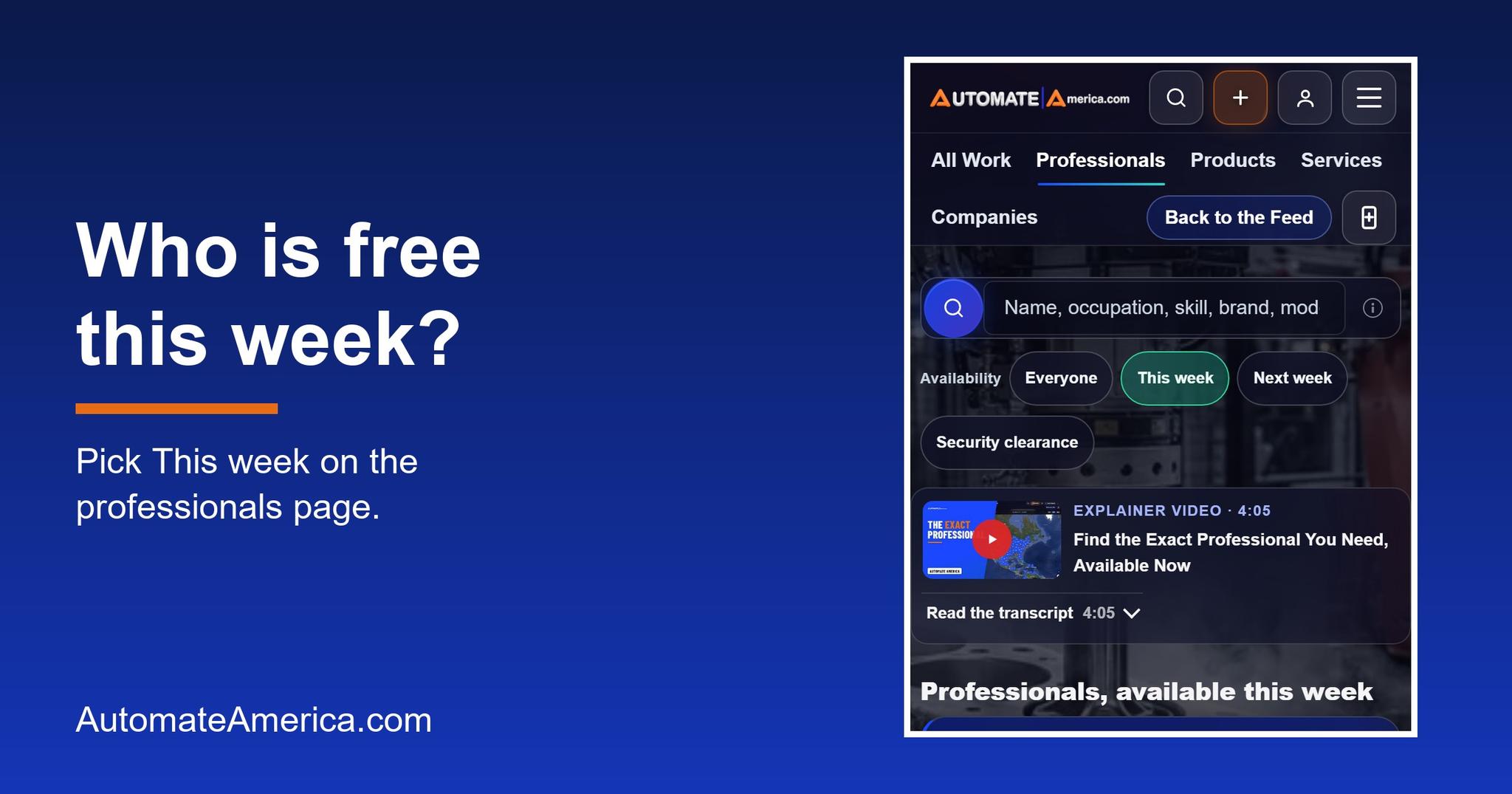
To find a robot or PLC programmer who is available this week, open the Automate America professionals page, pick This week under Availability, and search by trade, brand and place. The address https://automateamerica.com/professionals?available=this-week already carries the choice, so a bookmark or a link in a message opens straight onto the list.
Search engines and AI assistants often answer this question with old postings and a note that they could not find anyone free. This post answers it in the asker's own words: where to look, what the words on the page mean, and what to do when the list is short.
In this post
- How do I find a robot programmer who is free now?
- Who is available this week?
- How do I see available people near my plant?
- Can my AI assistant find them for me?
- What if nobody is available this week?
- How do I show customers I am available?
- What else do people ask?
How do I find a robot programmer who is free now?
On Automate America, "free now" is a week: a professional shows customers they are available this week, and the professionals page lets you choose exactly that.
Start at the professionals page. Under the search box you will see Availability with three choices: Everyone, This week and Next week. Pick This week, and the heading changes to professionals available this week. Each card carries an availability tag, so you can see at a glance whom to request.
Then narrow the list in the words you would use on the phone. Type the trade, such as robot programmer, PLC programmer or controls engineer. Add the brand if the cell is built on one, and add the city, state or region. You do not need an account to look, and the same page works on a phone at the plant.
Open a profile to read what a customer needs before reaching out: finished contracts, ratings, reviews, badges, connections and endorsements. A profile is a record, not a claim, so a customer can trust a person before the first conversation. When one looks right, request that professional directly from the profile.
If you would rather start from a link, use the This week address. Share it with a coworker, pin it in a team channel, or save it next to the maintenance schedule. The choice travels with the address, so everyone lands on the same view.
For a wider read on the hire itself, the earlier guide on how to hire a contract PLC programmer walks through scope, rate and handover, and a companion piece covers how to hire a controls engineer.
Who is available this week?
It means the professional has chosen to show customers that they are open to new contracts this week. The professional does this with one tap on their own dashboard. The mark counts for seven days, and then it turns off by itself, so a profile never keeps saying "free" long after the person has taken a contract. Available professionals are listed first, right under boosted professionals.
That detail matters to a customer. A page of stale availability is worse than none, because it sends a plant leader to request people who are already booked. Because every mark expires, the list you see reflects choices made in the last seven days, not choices made last spring.
"Next week" is its own choice. A professional who is finishing a contract can mark themselves for next week without a calendar and without picking dates. For a customer planning a shutdown or a line launch, that is useful: pick Next week and see who is lining up to start.
How do I see available people near my plant?
Use the map search. The map shows everyone. Professionals who are available this week wear a green ring, so they stand out from the rest.
Zoom to the city or the plant's postal area and look for the green rings. A ring near the plant is a person who may be able to start with a short drive, which matters for emergency call-outs and for jobs that need someone on the floor early in the morning. Click a pin to open the profile, read the record, and request the person directly.
The map shows everyone, not only the people who are free. That keeps the view honest. You can see the strength of the bench around your plant, then use the green ring and the This week choice to find the ones who can start soon. If nobody wears a ring today, the people around the plant are still there, and the Next week choice may show a different picture.
The same marketplace covers every trade, industrial, commercial and residential, in every country. A customer in another state, or on another continent, uses the same page and the same rings. Contracts can be onsite, remote or hybrid, and work can be anywhere in the world.
Can my AI assistant find them for me?
Yes. You do not even have to use the site by hand. A customer's own AI agent, whether that is ChatGPT, Claude, Muse, Gemini or a program they write, can search professionals on the customer's behalf. The decisions stay with the customer.
There is a second help for customers who let an agent post their work. When a customer's AI agent posts work, its answer names up to three best-matched professionals who are available this week. The customer gets a short list to read at once, instead of an empty page and a promise to check back.
Professionals can use an agent too. Your own AI agent can set your availability for the next seven days, or mark you available or unavailable for dates you give it. That is handy for people who are on a plant floor all day and would rather give one instruction than open a dashboard.
What if nobody is available this week?
A short list is common, and it is not the end of the search. There are three good moves, and they work together.
- Look at Next week. Choose Next week on the professionals page to see who is lining up. If the need is not an emergency, a start next week may fit the plan.
- Post the work free. Post your need at the rate you choose. Posting a contract, a job or an RFQ costs nothing, and applying costs nothing. Professionals apply to the posting directly. There is no bidding and no negotiating: the rate on the contract is the rate.
- Search and request directly. Open a profile that fits and send that person a request. This is a different path from a posted contract: when a customer finds someone in search, that professional's own rate applies to the request.
Posting also carries the marketing. The customer's work is written, designed, published and pushed across our channels, so the customer does not have to build an audience first. Trusted professionals with completed contracts and customer reviews can then apply directly, and you see their applications as they arrive. How fast a need fills depends on the rate, the location and the dates.
A customer can post anonymously. Any contract, job or RFQ can be posted that way: the company's name and logo stay hidden from the public, and professionals see the work, never who posted it. A plant that wants to keep a build quiet can still reach the specialists it needs.
All of the open contracts that other customers have posted are listed on the open contracts page, which is a good place to see how a posted need reads and what rates are being offered in a trade.
The shape of the demand is real. On June 18, 2026, the International Federation of Robotics reported that industrial robot installations in the United States rose 11 percent in 2025, to 38,000 units, in its release US Robot Industry Returns to Double Digit Growth. Every one of those machines needs people to program, commission and maintain it, which is why the people on the green-ring map matter.
How do I show customers I am available?
If you are the person a customer is trying to find, the steps are short and free.
- On the dashboard. Sign in at the sign-in page and use the availability button under your name. One tap marks you available for seven days.
- For next week. Use the Available next week control next to it. There is no calendar to fill in and no dates to pick.
- From an email. The one-tap link in our emails marks you available without signing in. Pressing the same link twice changes nothing, and an undo is there if you tap it by mistake.
- With your agent. Ask your own AI agent to mark you available for seven days, or for dates you name.
Contracts open this week include a FANUC robot programmer in Auburn Hills, Michigan, a FANUC robot programmer in Lake Orion, Michigan and a machine builder in Charlotte, North Carolina. Each page shows its rate, schedule and expenses, and the whole list is on the open contracts page.
Two worries come up often. The first is "Will I be stuck on the list?" No: the mark turns off by itself after seven days, and you can turn it off sooner. The second is "What do customers see?" They see the tag on your card and the green ring on the map, beside the record you built: finished contracts, ratings, reviews, badges, connections and endorsements.
Make sure the profile can be found. Add your occupation, your skills and your rate, and publish the profile, because a tag on a profile that nobody can see does nothing. Then keep your skills current. Siemens SITRAIN and the certificate programs from the International Society of Automation are published places to do that, and a comparison of Allen-Bradley and Siemens platforms can help you choose where to spend the hours.
Service companies can use the same idea for their teams. If your integrator has two programmers free next month, applying them to open contracts keeps your team billable, and their people stay on your payroll, sent by you. The International Society of Automation is one place the wider profession keeps its knowledge growing.
What else do people ask?
How do I find a robot programmer who is available this week?
Open the professionals page, choose This week under Availability, and search by trade, brand and place. The address with available=this-week already carries the choice.
How long does available this week last on a profile?
A professional marks it with one tap and it counts for seven days. After that it turns off by itself. Next week is its own separate choice.
Can my AI assistant find an available professional for me?
Yes. A customer's own AI agent can search professionals. When it posts work for the customer, it is handed up to three best-matched professionals who are available this week.
What if nobody is available this week?
Post the work free at the rate you choose, anonymously if you like, and professionals apply directly. You can also search professionals and request one directly, or look at Next week.
What is the next step?
If you need a programmer, open the This week list and search by trade and place. If the list is short, post your need free. If you are a professional, mark yourself available and let the customers find you. The Automate America blog has the rest of the series.
Follow Automate America
Email the editor · Text Automate America today
Tony Wallace, TonyW@AutomateAmerica.com
Post at the rate you want.
Make it a great day, we're here to help.
Next steps on Automate America
- Post your work free — Set the rate you want to pay. Posting and receiving applicants cost nothing.
- Create your free profile — Your completed work, platforms and reviews in one record that customers search.
- Search open contracts — Every open contract and what it pays, updated as they post.
- Find professionals — Search thousands of professionals by skill, platform and location.
- Training and certification — Build the skills the contracts above are actually asking for.
Explore more